
XSLT is a short form of ‘EXtensible Stylesheet Language Transformation’, powerful technology and used to transform XML into various formats such as HTML. In this post, we will see how to convert an XML file to HTML with the help of XSLT in Java.
Key points:
- HTML stands for ‘Hypertext Markup Language’.
- XML stands for ‘Extensible Markup Language’.
- XSLT provides the ability to transform XML from one format to another.
- XSL is used to filter and sorts the XML data and can format XML.
- XSL can be used to define how an XML file should look like by transforming the XML file into a browser recognizable format.
Prerequisite Files:
1. XML file (say report.xml)
2. XSL file (say stylesheet.xsl)
Sample XML file : report.xml
1 2 3 4 5 6 7 8 9 10 11 12 13 | <?xml version="1.0" encoding="UTF-8"?> <urlset> <url> <stepno>1</stepno> <stepname>Successfully Started browser at http://www.officedepot.com</stepname> <status>PASS</status> </url> <url> <stepno>2</stepno> <stepname>click : By.cssSelector: .ui-link-inherit</stepname> <status>PASS</status> </url> </urlset> |
Sample XSL file : stylesheet.xsl
1 2 3 4 5 6 7 8 9 10 11 12 13 14 15 16 17 18 19 20 21 22 23 24 25 26 27 28 29 30 | <?xml version="1.0" encoding="UTF-8"?> <xsl:stylesheet xmlns:xsl="http://www.w3.org/1999/XSL/Transform" version="1.0"> <xsl:template match="/"> <html> <body> <h1>Test Case Results</h1> <table border="1"> <tr> <th>stepno</th> <th>stepname</th> <th>status</th> </tr> <xsl:for-each select="urlset/url"> <tr> <td> <xsl:value-of select="stepno" /> </td> <td> <xsl:value-of select="stepname" /> </td> <td> <xsl:value-of select="status" /> </td> </tr> </xsl:for-each> </table> </body> </html> </xsl:template> </xsl:stylesheet> |
Below is the Java code to generate an HTML file using above XML and XSL files: (say report.html)
1 2 3 4 5 6 7 8 9 10 11 12 13 14 15 16 17 18 19 20 21 22 23 24 25 26 27 28 29 30 31 32 33 34 35 36 37 38 39 40 41 42 43 44 45 | import java.io.FileOutputStream; import java.io.OutputStream; import javax.xml.transform.Source; import javax.xml.transform.Transformer; import javax.xml.transform.TransformerFactory; import javax.xml.transform.stream.StreamResult; import javax.xml.transform.stream.StreamSource; public class Xmltohtml { public static void main(String[] args) throws Exception { try { TransformerFactory tFactory = TransformerFactory.newInstance(); Source xslDoc = new StreamSource("/Users/jradmin/Documents/stylesheet.xsl"); Source xmlDoc = new StreamSource("/Users/jradmin/Documents/report.xml"); String outputFileName = "/Users/jradmin/Documents/report.html"; OutputStream htmlFile = new FileOutputStream(outputFileName); Transformer trasform = tFactory.newTransformer(xslDoc); trasform.transform(xmlDoc, new StreamResult(htmlFile)); } catch (Exception e) { e.printStackTrace(); } } } |
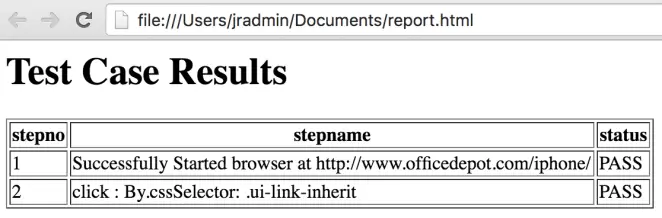
Below is the generated HTML report (report.html):
Reference:


I need to read xml file, which structure is not fixed and show the xml data in key-value pair like Json formate but it should not have any braces like {[]} in an Html page
Not : xml have multiple child node inside the nodes
Hi Radhe,
First of all, sorry for late response.
Well, I am not clear about the objective you are seeking through your question.
Kindly share the sample of your xml file that you want to read and also share the sample html format that you would like to achieve.
I’ll try my best to help you out.
Thanks