

In this tutorial, we will learn how to convert POJO into a JSON & JSON back into POJO using java based Jackson-databind API. The ObjectMapper class provided by Jackson API provides functionality for converting between Java Objects and JSON.
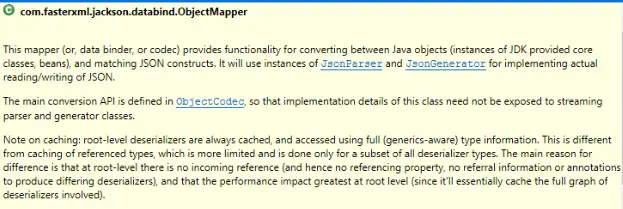
Maven dependencies
If you are using Maven as a build tool in your project, then add the following dependency in your pom.xml file.
1 2 3 4 5 | <dependency> <groupId>com.fasterxml.jackson.core</groupId> <artifactId>jackson-databind</artifactId> <version>2.9.4</version> </dependency> |
else, download & add the following Jars into your project classpath:
- jackson-core
- jackson-databind
- jackson-annotation
Convert POJO to JSON and vice versa using Jackson API...!!! Share on X
Example 1. POJO to JSON conversion
1 2 3 4 5 6 7 8 9 10 11 12 13 14 15 16 17 18 19 20 21 22 23 24 25 26 27 28 29 30 31 32 33 34 35 36 37 38 39 40 41 42 43 44 45 46 47 48 49 50 51 52 53 54 55 56 | import java.io.File; import com.fasterxml.jackson.databind.ObjectMapper; public class PojoToJson_Jackson { public static void main(String[] args) throws Exception { //**Create ObjectMapper ObjectMapper mapperObj = new ObjectMapper(); Student student = new Student(); student.setId(5); student.setName("Isha"); student.setSkill("Google Analytics"); //**Save Java Objects to a JSON File mapperObj.writeValue(new File("c:\\temp\\student.json"), student); //**Convert Java Objects to JSON String //Normal print String json1 = mapperObj.writeValueAsString(student); System.out.println("Normal print: \n" + json1); //Pretty print String json2 = mapperObj.writerWithDefaultPrettyPrinter().writeValueAsString(student); System.out.println("\nPretty print: \n" + json2); } } class Student { int id; String name; String skill; public int getId() { return id; } public void setId(int id) { this.id = id; } public String getName() { return name; } public void setName(String name) { this.name = name; } public String getSkill() { return skill; } public void setSkill(String skill) { this.skill = skill; } } |
1 2 3 4 5 6 7 8 9 | Normal print: {"id":5,"name":"Isha","skill":"Google Analytics"} Pretty print: { "id" : 5, "name" : "Isha", "skill" : "Google Analytics" } |
Example 2. JSON to POJO conversion
1 2 3 4 5 6 7 8 9 10 11 12 13 14 15 16 17 18 19 20 21 22 23 24 25 26 27 28 29 30 31 32 33 34 35 36 37 38 39 40 41 42 43 44 45 46 47 48 49 50 51 52 53 | import java.io.FileInputStream; import com.fasterxml.jackson.databind.ObjectMapper; public class JsonToPojo_Jackson { public static void main(String[] args) throws Exception { //**Create ObjectMapper ObjectMapper mapperObj = new ObjectMapper(); //**Extract JSON format data from a file and convert it to plain Java object using ObjectMapper FileInputStream fileInputStreamObj = new FileInputStream("c:\\temp\\student.json"); Student student = mapperObj.readValue(fileInputStreamObj, Student.class); //**Print POJOs System.out.println("Student ID : " + student.getId()); System.out.println("Student Name : " + student.getName()); System.out.println("Student Skill : " + student.getSkill()); fileInputStreamObj.close(); } } class Student { int id; String name; String skill; public int getId() { return id; } public void setId(int id) { this.id = id; } public String getName() { return name; } public void setName(String name) { this.name = name; } public String getSkill() { return skill; } public void setSkill(String skill) { this.skill = skill; } } |
1 2 3 | Student ID : 5 Student Name : Isha Student Skill : Google Analytics |
Do you like this Post? – then check my other helpful posts:
- Double the even / odd numbers of a specified ArrayList using Streams
- Double the numbers of specified ArrayList using Streams


