
There could be a situation as it happen quite often that default sendKeys option provided by Selenium Webdriver to send text does’t work and even retrieving text doesn’t work too in any of the browser. To handle such a situation, JavascriptExecutor comes to rescue. Therefore, In this article, we are going to learn “How to send and get text using JavascriptExecutor instead of using default ways provided by Selenium Webdriver?”. It’s a super handy solution and works quite every time.
SEND TEXT AND GET TEXT USING JAVASCRIPTEXECUTOR...!!! Share on X
Example 1. Send text with JavascriptExecutor (Not using Selenium’s sendKeys option)
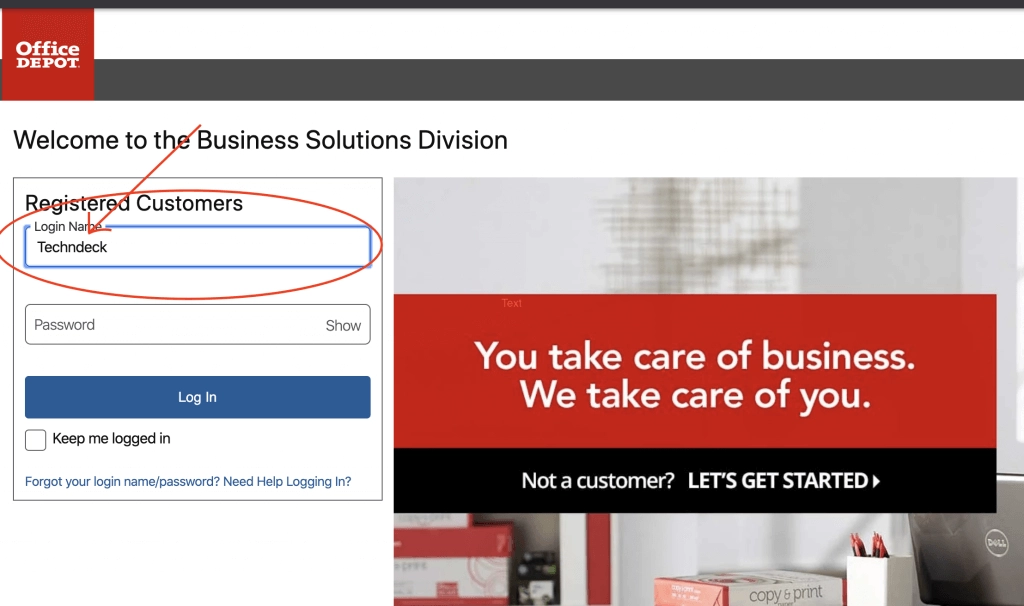
In this example, we are accessing a website (business.officedepot.com) and entering login name as ‘Techndeck’ using JavascriptExecutor
1 2 3 4 5 6 7 8 9 10 11 12 13 14 15 16 17 18 19 20 21 22 23 24 25 26 27 28 29 30 31 32 33 34 35 36 37 38 39 40 41 42 43 | import org.openqa.selenium.JavascriptExecutor; import org.openqa.selenium.WebDriver; import org.openqa.selenium.chrome.ChromeDriver; import org.testng.annotations.Test; import io.github.bonigarcia.wdm.WebDriverManager; public class SendTextUsingJavascriptExecutor { @Test public void javaScriptExecutor_SendText() throws InterruptedException { WebDriver driver; //You can specify the hardcoded value of a chrome driver or driver based on your browser like below line //System.setProperty("webdriver.chrome.driver", "/Users/d33p4k/driver/chromedriver"); //OR //Use below line to manage driver by WebdriverManager for chrome browser in our case (you can use any other driver of your choice) WebDriverManager.chromedriver().setup(); driver = new ChromeDriver(); //Access OfficeDepot Business website driver.get("https://business.officedepot.com"); driver.manage().window().maximize(); //Create JavascriptExecutor object JavascriptExecutor js = (JavascriptExecutor) driver; //Enter Techndeck in the loginName field on the Office Depot Business website homepage using Javascipt Executor js.executeScript("document.getElementById('loginNameBsd').value='Techndeck';"); Thread.sleep(5000); driver.close(); driver.quit(); } } |
Output:
Example 2. Get/Retrieve text with JavascriptExecutor
In this example, we are accessing a website (business.officedepot.com) and trying to retrieve the text written on the login button using JavascriptExecutor
1 2 3 4 5 6 7 8 9 10 11 12 13 14 15 16 17 18 19 20 21 22 23 24 25 26 27 28 29 30 31 32 33 34 35 36 37 38 39 40 41 42 43 44 | import org.openqa.selenium.JavascriptExecutor; import org.openqa.selenium.WebDriver; import org.openqa.selenium.chrome.ChromeDriver; import org.testng.annotations.Test; import io.github.bonigarcia.wdm.WebDriverManager; public class GetTextUsingJavascriptExecutor { @Test public void javaScriptExecutor_GetText() throws InterruptedException { WebDriver driver; //You can specify the hardcoded value of a chrome driver or driver based on your browser like below line //System.setProperty("webdriver.chrome.driver", "/Users/d33p4k/driver/chromedriver"); //OR //Use below line to manage driver by WebdriverManager for chrome browser in our case (you can use any other driver of your choice) WebDriverManager.chromedriver().setup(); driver = new ChromeDriver(); //Access OfficeDepot Business website driver.get("https://business.officedepot.com"); driver.manage().window().maximize(); //Create JavascriptExecutor object JavascriptExecutor js = (JavascriptExecutor) driver; //Enter Techndeck in the loginName field on the Office Depot Business website homepage using Javascipt Executor String text = js.executeScript("return document.getElementById('loginSubmit').value").toString(); System.out.println("Text written on the login button is- " + text); Thread.sleep(5000); driver.close(); driver.quit(); } } |
Output:
1 2 3 4 5 6 7 8 9 10 11 12 13 14 15 | [RemoteTestNG] detected TestNG version 7.0.0 Starting ChromeDriver 80.0.3987.106 (f68069574609230cf9b635cd784cfb1bf81bb53a-refs/branch-heads/3987@{#882}) on port 44696 Only local connections are allowed. Please protect ports used by ChromeDriver and related test frameworks to prevent access by malicious code. Apr 11, 2020 9:13:26 PM org.openqa.selenium.remote.ProtocolHandshake createSession INFO: Detected dialect: W3C Text written on the login button is- Log In PASSED: javaScriptExecutor_SendText =============================================== Default test Tests run: 1, Failures: 0, Skips: 0 =============================================== |
SEND TEXT AND GET TEXT USING JAVASCRIPTEXECUTOR...!!! Share on X
Do you like this Post? – then check my other helpful posts:
- Double the even / odd numbers of a specified ArrayList using Streams
- Double the numbers of specified ArrayList using Streams


